Note: Internet Explorer and Safari do not support SVG filters! All SVG filters for the Internet are defined in The first example is offset by a rectangle (with Here is the SVG code: Example Code parsing: Now, the offset image can be blurred (including Here is the SVG code: Example Code parsing: The stdDeviation attribute of the < feGaussianBlur > element defines the fuzzy amount Now, make a black shadow: Here is the SVG code: Example Code parsing: The attribute of the < feOffset > element is changed to “SourceAlpha” to use the residual shadow in the Alpha channel instead of the entire RGBA pixel. Now put a layer of color on the shadow: Here is the SVG code: Example Code parsing:
In recent years, Geographic Information Systems (GIS) have undergone rapid development in both theoretical and practical dimensions. GIS has been widely applied for modeling and decision-making support across various fields such as urban management, regional planning, and environmental remediation, establishing geographic information as a vital component of the information era. The introduction of the “Digital Earth” concept has further accelerated the advancement of GIS, which serves as its technical foundation. Concurrently, scholars have been dedicated to theoretical research in areas like spatial cognition, spatial data uncertainty, and the formalization of spatial relationships. This reflects the dual nature of GIS as both an applied technology and an academic discipline, with the two aspects forming a mutually reinforcing cycle of progress. 1.16.1.
1.16.2. SVG
Example 1 

<svg xmlns="http://www.w3.org/2000/svg" version="1.1">
<defs>
<filter id="f1" x="0" y="0" width="200%" height="200%">
<feOffset result="offOut" in="SourceGraphic" dx="20" dy="20" />
<feBlend in="SourceGraphic" in2="offOut" mode="normal" />
filter>
defs>
<rect width="90" height="90" stroke="green" stroke-width="3"
fill="yellow" filter="url(#f1)" />
svg>
Example 2 
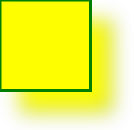
<svg xmlns="http://www.w3.org/2000/svg" version="1.1">
<defs>
<filter id="f1" x="0" y="0" width="200%" height="200%">
<feOffset result="offOut" in="SourceGraphic" dx="20" dy="20" />
<feGaussianBlur result="blurOut" in="offOut" stdDeviation="10" />
<feBlend in="SourceGraphic" in2="blurOut" mode="normal" />
filter>
defs>
<rect width="90" height="90" stroke="green" stroke-width="3"
fill="yellow" filter="url(#f1)" />
svg>
Example 3 
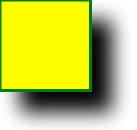
<svg xmlns="http://www.w3.org/2000/svg" version="1.1">
<defs>
<filter id="f1" x="0" y="0" width="200%" height="200%">
<feOffset result="offOut" in="SourceAlpha" dx="20" dy="20" />
<feGaussianBlur result="blurOut" in="offOut" stdDeviation="10" />
<feBlend in="SourceGraphic" in2="blurOut" mode="normal" />
filter>
defs>
<rect width="90" height="90" stroke="green" stroke-width="3"
fill="yellow" filter="url(#f1)" />
svg>
Example 4 
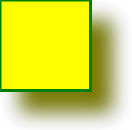
<svg xmlns="http://www.w3.org/2000/svg" version="1.1">
<defs>
<filter id="f1" x="0" y="0" width="200%" height="200%">
<feOffset result="offOut" in="SourceGraphic" dx="20" dy="20" />
<feColorMatrix result="matrixOut" in="offOut" type="matrix"
values="0.2 0 0 0 0 0 0.2 0 0 0 0 0 0.2 0 0 0 0 0 1 0" />
<feGaussianBlur result="blurOut" in="matrixOut" stdDeviation="10"
/>
<feBlend in="SourceGraphic" in2="blurOut" mode="normal" />
filter>
defs>
<rect width="90" height="90" stroke="green" stroke-width="3"
fill="yellow" filter="url(#f1)" />
svg>
Principles, Technologies, and Methods of Geographic Information Systems
102
