
Kotlin download address of command line compilation tool: JetBrains/kotlin , the latest is 1.1.2-2.
You can choose the latest stable version to download.
When the download is complete, extract it to the specified directory, and then set the A simpler installation method is also available on OS X, Linux, Cygwin, FreeBSD, and Solaris systems with the following commands: Under OS X, you can use the If you are Create a file named Use If you want to see all the options available, run: Run the application If you need to add the generated Because of the generated in this way You can also use it. We can run the following command to get an interactive For example, we create a file named Pass at execution time
In recent years, Geographic Information Systems (GIS) have undergone rapid development in both theoretical and practical dimensions. GIS has been widely applied for modeling and decision-making support across various fields such as urban management, regional planning, and environmental remediation, establishing geographic information as a vital component of the information era. The introduction of the “Digital Earth” concept has further accelerated the advancement of GIS, which serves as its technical foundation. Concurrently, scholars have been dedicated to theoretical research in areas like spatial cognition, spatial data uncertainty, and the formalization of spatial relationships. This reflects the dual nature of GIS as both an applied technology and an academic discipline, with the two aspects forming a mutually reinforcing cycle of progress. bin directory is added to the system environment variable.``bin`` directory contains compiling and running Kotlin required script. 3.4.1. SDKMAN! #
$ curl -s https://get.sdkman.io | bash

$ sdk install kotlin
3.4.2. Homebrew #
Homebrew installation:$ brew update
$ brew install kotlin
3.4.3. MacPorts #
MacPorts for users, you can install using the following command:$ sudo port install kotlin
3.4.4. Create and run the first program #
hello.kt file, the code is as follows: 3.4.5. hello.kt #
funmain(args:Array<String>){println("Hello, World!")}
Kotlin compiler compiles applications:$ kotlinc hello.kt -include-runtime -d hello.jar
-d used to set the name of the compiled output, which can be class or .jar file can also be a directory. -include-runtime let .jar file contains Kotlin run the library so that you can run it directly.$ kotlinc -help
$ java -jar hello.jar
Hello, World!
3.4.6. Compile into a library #
jar package for others Kotlin , theprogram is used, but it does not need to include Kotlin runtime of:$ kotlinc hello.kt -d hello.jar
.jar file does not contain Kotlin runtime, so you should make sure that when it is used, the runtime is in your classpath . kotlin command to run Kotlin generated by thecompiler .jar file$ kotlin -classpath hello.jar HelloKt
hello.kt is the default class name generated by the compiler for the HelloKt . 3.4.7. Run REPL (interactive interpreter) #
shell and then enter any valid Kotlin code and see the result immediately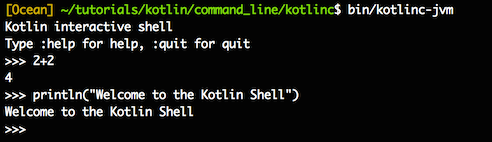
3.4.8. Use the command line to execute the script #
Kotlin can also be used as a scripting language with a file suffix named .kts . list_folders.kts code is as follows:import java.io.File
val folders = File(args[0]).listFiles { file -> file.isDirectory() }
folders?.forEach { folder -> println(folder) }
-script option to set the appropriate script file.$ kotlinc -script list_folders.kts
Principles, Technologies, and Methods of Geographic Information Systems
102