Kotlin download address of command line compilation tool: JetBrains/kotlin , the latest is 1.1.2-2.
You can choose the latest stable version to download.
When the download is complete, extract it to the specified directory, and then set the A simpler installation method is also available on OS X, Linux, Cygwin, FreeBSD, and Solaris systems with the following commands: Under OS X, you can use the If you are Create a file named Use If you want to see all the options available, run: Run the application If you need to add the generated Because of the generated in this way You can also use it. We can run the following command to get an interactive For example, we create a file named Pass at execution time
最近几年来,地理信息系统无论是在理论上还是应用上都处在一个飞速发展的阶段。 GIS被应用于多个领域的建模和决策支持,如城市管理、区划、环境整治等等,地理信息成为信息时代重要的组成部分之一; “数字地球”概念的提出,更进一步推动了作为其技术支撑的GIS的发展。 与此同时,一些学者致力于相关的理论研究,如空间感知、空间数据误差、空间关系的形式化等等。 这恰好说明了地理信息系统作为应用技术和学科的两个方面,并且这两个方面构成了相互促进的发展过程。 bin directory is added to the system environment variable.``bin`` directory contains compiling and running Kotlin required script. 3.4.1. SDKMAN! #
$ curl -s https://get.sdkman.io | bash $ sdk install kotlin
3.4.2. Homebrew #
Homebrew installation:$ brew update $ brew install kotlin
3.4.3. MacPorts #
MacPorts for users, you can install using the following command:$ sudo port install kotlin
3.4.4. Create and run the first program #
hello.kt file, the code is as follows: 3.4.5. hello.kt #
funmain(args:Array<String>){println("Hello, World!")}
Kotlin compiler compiles applications:$ kotlinc hello.kt -include-runtime -d hello.jar
-d used to set the name of the compiled output, which can be class or .jar file can also be a directory. -include-runtime let .jar file contains Kotlin run the library so that you can run it directly.$ kotlinc -help
$ java -jar hello.jar Hello, World!
3.4.6. Compile into a library #
jar package for others Kotlin , theprogram is used, but it does not need to include Kotlin runtime of:$ kotlinc hello.kt -d hello.jar
.jar file does not contain Kotlin runtime, so you should make sure that when it is used, the runtime is in your classpath . kotlin command to run Kotlin generated by thecompiler .jar file$ kotlin -classpath hello.jar HelloKt
hello.kt is the default class name generated by the compiler for the HelloKt . 3.4.7. Run REPL (interactive interpreter) #
shell and then enter any valid Kotlin code and see the result immediately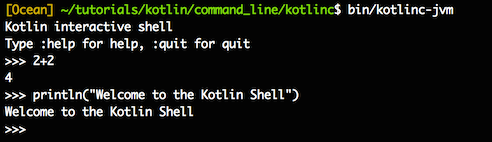
3.4.8. Use the command line to execute the script #
Kotlin can also be used as a scripting language with a file suffix named .kts . list_folders.kts code is as follows:import java.io.File val folders = File(args[0]).listFiles { file -> file.isDirectory() } folders?.forEach { folder -> println(folder) } -script option to set the appropriate script file.$ kotlinc -script list_folders.kts