最近几年来,地理信息系统无论是在理论上还是应用上都处在一个飞速发展的阶段。 GIS被应用于多个领域的建模和决策支持,如城市管理、区划、环境整治等等,地理信息成为信息时代重要的组成部分之一; “数字地球”概念的提出,更进一步推动了作为其技术支撑的GIS的发展。 与此同时,一些学者致力于相关的理论研究,如空间感知、空间数据误差、空间关系的形式化等等。 这恰好说明了地理信息系统作为应用技术和学科的两个方面,并且这两个方面构成了相互促进的发展过程。
We know that we use the SQL SELECT command in MySQL to read data, and we can read data in the SELECT Statement to get the specified record using the WHERE clause.
You can use the equal sign = in the WHERE clause to set conditions for getting data, such as “runoob_author = ‘RUNOOB.COM’”.
But sometimes we need to get runoob_author Field contains all records with the character “COM”, at this point we need to set the WHERE Use the SQL LIKE clause in the clause.
The percent sign% character is used in the SQL LIKE clause to represent any character, similar to the asterisk* in UNIX or regular expressions.
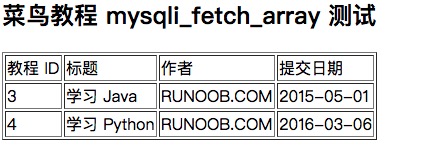
If the% sign is not used, the LIKE clause has the same effect as the equal sign =. The following is the general syntax for SQL SELECT statements to read data from a data table using the LIKE clause: You can specify any condition in the WHERE clause. You can use the like clause in the WHERE clause. You can use the LIKE clause instead of the equal sign =. LIKE is usually used with%, similar to a metacharacter search. You can specify one or more conditions using AND or OR. You can use the WHERE…LIKE clause in the DELETE or UPDATE command to specify the condition. Next we will use the WHERE…LIKE clause in the SQL SELECT command to read data from the MySQL data table runoob_tbl. The following is what we will do SQL LIKE statement: You can use the PHP function This function is used to execute the But if it is, The following is how we use the PHP script in the MySQL LIKE clause test: The output is shown in the following figure:Grammar 
SELECT field1, field2,...fieldN FROM table_name WHERE field1 LIKE condition1 [AND [OR]] filed2 = 'somevalue'
Use the LIKE clause at the command prompt 
Example 
runoob_tbl Get from the table runoob_author All records that end with COM in the field:mysql>useRUNOOB;Databasechangedmysql>SELECT\*fromrunoob_tblWHERErunoob_authorLIKE'%COM'; +-----------+---------------+---------------+-----------------+ \|runoob_id\|runoob_title\|runoob_author\|submission_date\| +-----------+---------------+---------------+-----------------+ \|3\| 学习Java\|RUNOOB.COM\|2015-05-01\| \|4\| 学习Python\|RUNOOB.COM\|2016-03-06\| +-----------+---------------+---------------+-----------------+2rowsinset(0.01sec)
Using the LIKE clause in PHP scripts 
mysqli_query() And the same SQL SELECT with the command of the WHERE…LIKE clause to get the data. SQL Command, and then pass the PHP Function mysqli_fetch_array() To output data for all queries. DELETE Or UPDATE You do not need to use the S QL statement that uses the WHERE…LIKE clause in the mysqli_fetch_array() Function.Example 
runoob_tbl Read from the table runoob_author All records that end with COM in the field:菜鸟教程 mysqli_fetch_array 测试
';echo'
';mysqli_close($conn);?> 教程 ID 标题 作者 提交日期 {$row['runoob_id']} "."{$row['runoob_title']} "."{$row['runoob_author']} "."{$row['submission_date']} "."