最近几年来,地理信息系统无论是在理论上还是应用上都处在一个飞速发展的阶段。 GIS被应用于多个领域的建模和决策支持,如城市管理、区划、环境整治等等,地理信息成为信息时代重要的组成部分之一; “数字地球”概念的提出,更进一步推动了作为其技术支撑的GIS的发展。 与此同时,一些学者致力于相关的理论研究,如空间感知、空间数据误差、空间关系的形式化等等。 这恰好说明了地理信息系统作为应用技术和学科的两个方面,并且这两个方面构成了相互促进的发展过程。
2.16.1. Brief introduction 
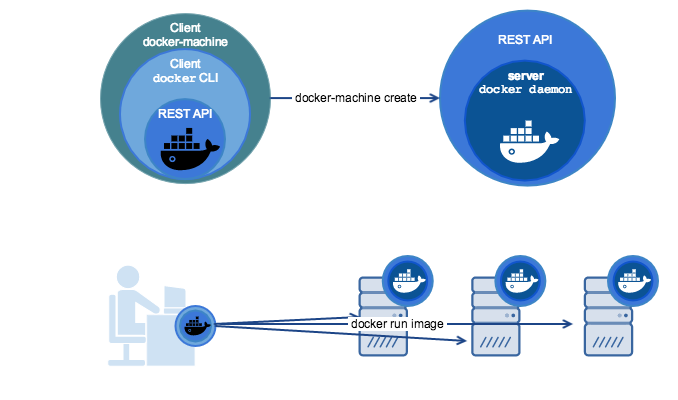
Docker Machine is a tool that allows you to install Docker on a virtual host and use the docker-machine command to manage the host.
Docker Machine can also centrally manage all docker hosts, such as quickly installing docker on 100 servers.

The virtual hosts managed by Docker Machine can be on-board or cloud providers, such as Aliyun, Tencent Cloud, AWS, or DigitalOcean.
Using the docker-machine command, you can start, check, stop, and restart the managed host, upgrade Docker clients and daemons, and configure the Docker client to communicate with your host.
2.16.2. Installation 
You need to install Docker before installing Docker Machine.
Docker Machine can be installed on a variety of platforms, including Linux, MacOS, and windows. If you are a Windows platform, you can use the Git BASH And enter the following command: Check to see if the installation was successful:Linux installation command 
$ base=https://github.com/docker/machine/releases/download/v0.16.0 && curl -L $base/docker-machine-$(uname -s)-$(uname -m) >/tmp/docker-machine && sudo mv /tmp/docker-machine /usr/local/bin/docker-machine && chmod +x /usr/local/bin/docker-machine
MacOS installation command 
$ base=https://github.com/docker/machine/releases/download/v0.16.0 && curl -L $base/docker-machine-$(uname -s)-$(uname -m) >/usr/local/bin/docker-machine && chmod +x /usr/local/bin/docker-machine
Windows installation command 
$ base=https://github.com/docker/machine/releases/download/v0.16.0 && mkdir -p "$HOME/bin" && curl -L $base/docker-machine-Windows-x86_64.exe > "$HOME/bin/docker-machine.exe" && chmod +x "$HOME/bin/docker-machine.exe"
$ docker-machine version docker-machine version 0.16.0, build 9371605
2.16.3. Use 
This chapter introduces the use of docker-machine through virtualbox. Other cloud service providers operate in the same way. You can refer to the guidance document of each service provider for details. You can see that there is currently only the default default virtual machine here. ` <../wp-content/uploads/2019/11/docker-machine1.png>` __ Create a machine called test. –driver Specifies the type of driver used to create the machine, in this case virtualbox. ` <../wp-content/uploads/2019/11/docker-machine2.png>` __ ` <../wp-content/uploads/2019/11/docker-machine3.png>` __ ` <../wp-content/uploads/2019/11/docker-machine4.png>` __ ` <../wp-content/uploads/2019/11/docker-machine5.png>` __ ` <../wp-content/uploads/2019/11/docker-machine6.png>` __ docker-machine active View the Docker host that is currently active. config View the connection information of the currently active Docker host. create : create a Docker host env Displays the environment variables required to connect to a host inspect : output the details of the specified Docker in json format ip : get the address of the specified Docker host kill Directly kill the specified Docker host ls List all management hosts provision Reconfigure the specified host regenerate-certs Regenerate TLS information for a host restart Restart the specified host rm Delete a Docker host, and the corresponding virtual machine will also be deleted ssh Connect to the host through SSH and execute the command scp Remote replication of data through scp between Docker hosts and between Docker hosts and local hosts mount Use SSHFS to mount or unmount directories from your computer start Start a specified Docker host, and if the object is a virtual machine, the virtual machine will be started status : get the status of the specified Docker host (including: Running, Paused, Saved, Stopped, Stopping, Starting, Error), etc. stop : stop a specified Docker host upgrade Update the Docker version of a specified host to the latest url : get the listening URL of the specified Docker host version Display the version of Docker Machine or the version of host Docker help : show help information1. List the available machines 
$ docker-machine ls
2. Create a machine 
$ docker-machine create --driver virtualbox test
3. Check the ip of the machine 
$ docker-machine ip test
4. Stop the machine 
$ docker-machine stop test
5. Start the machine 
$ docker-machine start test
6. Enter the machine 
$ docker-machine ssh test
Docker-machine command parameter description 
$ docker-machine ls NAME ACTIVE DRIVER STATE URL dev - virtualbox Running tcp://192.168.99.103:2376 staging * digitalocean Running tcp://203.0.113.81:2376 $ echo $DOCKER_HOST tcp://203.0.113.81:2376 $ docker-machine active staging