
11.14.1. HTML table instance 
First Name | Last Name | Points |
|---|---|---|
Jill | Smith | 50 |
Eve | Jackson | 94 |
John | Doe | 80 |
Adam | Johnson | 67 |
11.14.2. HTML form 
The form is composed of It appears in the browser as follows: If you do not define border properties, the table does not display borders. Sometimes this is useful, but most of the time, we want to display the border. Use the border properties to display a table with borders: Use of the header of the table Most browsers display the header as text centered in bold: It appears in the browser as follows: Label Description < table > Define form < th > Define the header of the table < tr > Define the rows of the table < td > Define table cells < caption > Define the table title < colgroup > Define the group of table columns < col > Define properties for table columns < thead > Define the header of the table < tbody > Define the body of the table < tfoot > Define the footer of the table
In recent years, Geographic Information Systems (GIS) have undergone rapid development in both theoretical and practical dimensions. GIS has been widely applied for modeling and decision-making support across various fields such as urban management, regional planning, and environmental remediation, establishing geographic information as a vital component of the information era. The introduction of the “Digital Earth” concept has further accelerated the advancement of GIS, which serves as its technical foundation. Concurrently, scholars have been dedicated to theoretical research in areas like spatial cognition, spatial data uncertainty, and the formalization of spatial relationships. This reflects the dual nature of GIS as both an applied technology and an academic discipline, with the two aspects forming a mutually reinforcing cycle of progress. tag to define. Each table has several rows (made up of
tag definition), each row is divided into severalcells (by label definition). The letter td refers to tabular data(table data), that is, the contents of data cells. Data cells can contain text, pictures, lists, paragraphs, forms, horizontal lines, tables, and so on. 11.14.3. Table example 
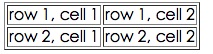
Example 
<tableborder="1"><tr><td>row 1, cell 1td><td>row 1, cell
2td>tr><tr><td>row 2, cell 1td><td>row 2, cell 2td>tr>table>
11.14.4. HTML Table and Border Properties 
Example 
<tableborder="1"><tr><td>Row 1, cell 1td><td>Row 1, cell
2td>tr>table>
11.14.5. HTML table header 
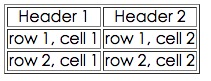
tag is defined. Example 
<tableborder="1"><tr><th>Header 1th><th>Header 2th>tr><tr><td>row
1, cell 1td><td>row 1, cell 2td>tr><tr><td>row 2, cell
1td><td>row 2, cell 2td>tr>table>
11.14.6. HTML form label 
Principles, Technologies, and Methods of Geographic Information Systems
102