最近几年来,地理信息系统无论是在理论上还是应用上都处在一个飞速发展的阶段。 GIS被应用于多个领域的建模和决策支持,如城市管理、区划、环境整治等等,地理信息成为信息时代重要的组成部分之一; “数字地球”概念的提出,更进一步推动了作为其技术支撑的GIS的发展。 与此同时,一些学者致力于相关的理论研究,如空间感知、空间数据误差、空间关系的形式化等等。 这恰好说明了地理信息系统作为应用技术和学科的两个方面,并且这两个方面构成了相互促进的发展过程。
When a user clicks a link, presses a button, or enters text, the interaction of these users will be triggered. DOM events.
In this chapter, we will learn how to bind these events using Angular event binding syntax.
The following Gif figure illustrates the operation of this example:
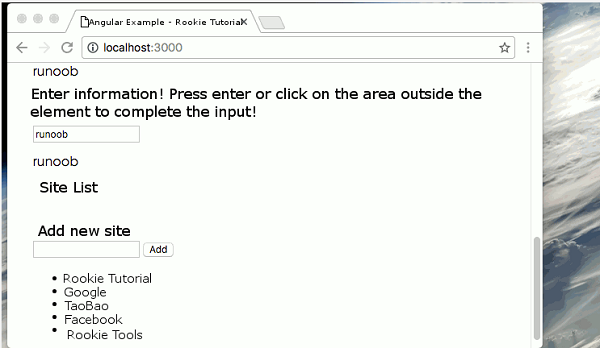
The source code can be downloaded at the end of the article. We can use the Angular event binding mechanism to respond to any DOM event. The following example binds the click event: The click to the left of the equal sign indicates that the click event of the button is taken as the binding target. To the right of the equal sign, the text in the quotation marks is a template statement The complete code is as follows: We can bind to all types of events. Let’s try binding to an input box {{values}} In the above code, we listen for an event and capture user input, and Angular stores the event object in the Component You can display user data by using local template variables, and template reference variables are achieved by adding a pound sign (#) before the identifier. The following example shows how to use local template variables: {{box.value}} We’re here We can use template reference variables to modify the above {{values}} We can get the value of the input box only when the user presses the enter (enter) key. (keyup) the event handling statement hears every keystroke, and we can filter the keystroke, such as every keystroke Angular can filter keyboard events for us by binding to Angular’s {{values}} Next we can use the The following example listens for events that both the enter key and the input box lose focus. {{values}} The source code used in this article can be downloaded in the following ways, not including 1.6.1. Bind to user input event 
app/click-me.component.ts file: ¶ import { Component } from '@angular/core'; @Component({ selector: 'click-me', template: ` {{clickMessage}}` }) export class ClickMeComponent { clickMessage = ''; onClickMe() { this.clickMessage = 'Rookie Tutorial!'; } } 1.6.2. Pass through
$event object to get user input ¶ keyup event and echo what the user typed back to the screen. app/keyup.component.ts (V1) file: ¶ @Component({ selector: 'key-up1', template: ` $event variable. onKey() method is used to extract user input from the event object and add the input value to the values property. 1.6.3. Get user input from a template reference variable 
app/loop-back.component.ts file: ¶ @Component({ selector: 'loop-back', template: ` Element defines a file named box the template reference variable of the box variable refers to the element itself, which means that we can get the input element’s value value and display it in the tag. keyup example:
app/keyup.components.ts (V2) documents: ¶ @Component({ selector: 'key-up2', template: ` 1.6.4. Keystroke event filtering (via
key.enter ) ¶ $event.keyCode updated only when the enter key is pressed values property. keyup.enter the pseudo event listens for the event of the enter key.
app/keyup.components.ts (v3): ¶ @Component({ selector: 'key-up3', template: ` 1.6.5.
blur (loss of focus) event ¶ blur (lose focus) event, which can be updated afterthe element loses focus values property.
app/keyup.components.ts (v4): ¶ @Component({ selector: 'key-up4', template: ` node_modules and typings catalogue.