最近几年来,地理信息系统无论是在理论上还是应用上都处在一个飞速发展的阶段。 GIS被应用于多个领域的建模和决策支持,如城市管理、区划、环境整治等等,地理信息成为信息时代重要的组成部分之一; “数字地球”概念的提出,更进一步推动了作为其技术支撑的GIS的发展。 与此同时,一些学者致力于相关的理论研究,如空间感知、空间数据误差、空间关系的形式化等等。 这恰好说明了地理信息系统作为应用技术和学科的两个方面,并且这两个方面构成了相互促进的发展过程。
Servlet filters can dynamically intercept requests and responses to transform or use the information contained in the request or response.
You can attach one or more Servlet filters to a Servlet or a set of Servlet.Servlet filters can also be attached to JavaServer Pages (JSP) files and HTML pages. Call all additional Servlet filters before calling Servlet.
Servlet filters are Java classes that can be used for Servlet programming todo the following:
Intercept client requests before accessing back-end resources.
The responses from the server are processed before they are sent back to theclient.
Various types of filters recommended according to the specification:
Authentication Filters.
Data compression Filters.
EEncryption Filters.
Triggers a resource access event filter.
Image Conversion Filters.
Logging and Auditing Filters.
MIME-TYPE Chain Filters.
Tokenizing Filters.
XSL/T filter (XSL/T Filters) to convert XML content.
The filter uses the Web deployment descriptor web.xml and then map to the Servlet name or URL schema in your application’s deployment descriptor.
When the Web container starts the Web application, it creates an instance ofeach filter that you declare in the deployment descriptor.
The execution order of Filter is similar to that of the The filter is an implementation of Serial number Method & description 1 2 3 Filter’s Such as the In The following is an example of a Servlet filter that outputs the name and address of the Web site. This example gives you a basic understanding of Servlet filters, and you can write more complex filter applications using the same concepts: Use the above mentioned here. Define a filter and then map to a URL or Servlet in much the same way as defining a Servlet and then mapping to an URL schema. In the deployment descriptor file The above filter applies to all Servlet because we specify in the configuration Now try calling any Servlet in the usual way, and you will see the logs generated in the Web server. You can also use the Log4J logger to log the above to a separate file. Next, we visit the instance address http://localhost:8080/TomcatTest/DisplayHeader , and take a look at the output in the console, as shown below: Web applications can define several different filters for a specific purpose. Suppose you define two filters In web.xml For example, the above example will apply LogFilter first and then AuthenFilter, but the following example will reverse this order: In the filter, you can use the The web.xml the configuration order in the configuration file is the same, and Filter is generally configured before all Servlet. 2.10.1. Servlet filter method 
javax.servlet.Filter the Java class of the interface. javax.servlet.Filter the interface defines three methods: public void doFilter (ServletRequest, ServletResponse, FilterChain) thismethod completes the actual filtering operation, and when the client requests a URL whose method matches the filter settings, the Servlet container will first call the filter’s doFilter method. FilterChain users access subsequent filters. public void init(FilterConfig filterConfig) when the web application starts, the web server will create an instance object of Filter, call its init method, read the web.xml configuration, and complete the initializationof the object, thus preparing for the interception of subsequent user requests (the filter object will only be created once, and the init method will only be executed once). Developers can obtain a FilterConfig object that represents the current filter configuration information through the parameters of the init method. public void destroy() the Servlet container calls this method before destroying the filter instance, releasing the resources consumed by the Servlet filter in this method. 2.10.2. FilterConfig usage 
init method provides a FilterConfig object. web.xml file configuration is as follows:<filter> <filter-name>LogFilterfilter-name> <filter-class>com.runoob.test.LogFilterfilter-class> <init-param> <param-name>Siteparam-name> <param-value>Rookie Tutorialparam-value> init-param> filter>
init method use FilterConfig object to get parameters: public void init(FilterConfig config) throws ServletException { // Get initialization parameters String site = config.getInitParameter("Site"); // Output initialization parameters System.out.println("Site Name: " + site); }
2.10.3. Servlet filter instance 
package com.runoob.test; //Import necessary Java libraries import javax.servlet.*; import java.util.*; //Implement the Filter class public class LogFilter implements Filter { public void init(FilterConfig config) throws ServletException { // Get initialization parameters String site = config.getInitParameter("Site"); // Output initialization parameters System.out.println("Site Name: " + site); } public void doFilter(ServletRequest request, ServletResponse response, FilterChain chain) throws java.io.IOException, ServletException { // Output Site Name System.out.println("Website URL:http://www.runoob.com"); // Send the request back to the filtering chain chain.doFilter(request,response); } public void destroy( ){ /* Called before the Filter instance is removed from the service by the Web container */ } }
DisplayHeader.java as an example: //Import necessary Java libraries import java.io.IOException; import java.io.PrintWriter; import java.util.Enumeration; import javax.servlet.ServletException; import javax.servlet.annotation.WebServlet; import javax.servlet.http.HttpServlet; import javax.servlet.http.HttpServletRequest; import javax.servlet.http.HttpServletResponse; @WebServlet("/DisplayHeader") //Extend HttpServlet Class public class DisplayHeader extends HttpServlet { // Method for handling GET method requests public void doGet(HttpServletRequest request, HttpServletResponse response) throws ServletException, IOException { // Set response content type response.setContentType("text/html;charset=UTF-8"); PrintWriter out = response.getWriter(); String title = "HTTP Header Request Example - Rookie Tutorial Example"; String docType = " \n"; out.println(docType + "\n" + "\"utf-8\">
\"center\">" + title + "\n" + "
\"100%\" border=\"1\" align=\"center\">\n" + "
\"#949494\">\n" + " Header name Header value\n"+ "\n"); Enumeration headerNames = request.getHeaderNames(); while(headerNames.hasMoreElements()) { String paramName = (String)headerNames.nextElement(); out.print(" " + paramName + "\n"); String paramValue = request.getHeader(paramName); out.println(" " + paramValue + "\n"); } out.println("\n"); } // Method for handling POST method requests public void doPost(HttpServletRequest request, HttpServletResponse response) throws ServletException, IOException { doGet(request, response); } } 2.10.4. Servlet filter Mapping in Web.xml 
web.xml create the following entry for the filter tag in:
/\* . If you only want to apply filters to a small number of Servlet, you can specify a specific Servlet path. 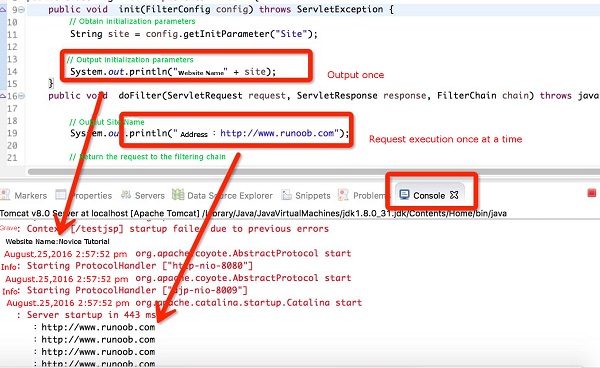
2.10.5. Use multiple filters 
AuthenFilter and LogFilter .You need to create a different mapping as described below, and the rest of the processing is roughly the same as explained above: <filter> <filter-name>LogFilterfilter-name> <filter-class>com.runoob.test.LogFilterfilter-class> <init-param> <param-name>test-paramparam-name> <param-value>Initialization Paramterparam-value> init-param> filter> <filter> <filter-name>AuthenFilterfilter-name> <filter-class>com.runoob.test.AuthenFilterfilter-class> <init-param> <param-name>test-paramparam-name> <param-value>Initialization Paramterparam-value> init-param> filter> <filter-mapping> <filter-name>LogFilterfilter-name> <url-pattern>/*url-pattern> filter-mapping> <filter-mapping> <filter-name>AuthenFilterfilter-name> <url-pattern>/*url-pattern> filter-mapping>
2.10.6. Application order of filter 
filter-mapping The order of elements determines the order inwhich the Web container applies the filter to the Servlet. To reverse the order of the filters, you only need to use the web.xml invert in file filter-mapping elements are fine. <filter-mapping> <filter-name>AuthenFilterfilter-name> <url-pattern>/*url-pattern> filter-mapping> <filter-mapping> <filter-name>LogFilterfilter-name> <url-pattern>/*url-pattern> filter-mapping>
2.10.7. web.xml configuring each node description 
FilterConfig interface object to access the initialization parameters.
REQUEST , INCLUDE , FORWARD , and ERROR . The default is REQUEST . Users can set multiple child elements to specify Filter intercepts multiple ways of calling resources.
REQUEST :When the user accesses the page directly, the Web container willcall the filter If the target resource is through the RequestDispatcher of include() or forward() , the filter will not be called when the method is accessed. INCLUDE :If the target resource is through the RequestDispatcher ofthe include() filter is called when the method is accessed. Otherwise,the filter will not be called. FORWARD :If the target resource is through the RequestDispatcher of``forward()`` when the method is accessed, the filter will be called; otherwise, the filter will not be called. ERROR :If the target resource is called through a declarative exception handling mechanism, the filter will be called Otherwise, the filter will notbe called.